The Original and Still #1
Karaoke Software!
If You Use Karaoke Discs You Need...
Microstudio® Karaoke Software
This all-in-one software gives you (more details):
- Import Songs to the Hard Drive as MP3+G, ZIP, or WMA+G songs from Karaoke and Audio CD using Ultra-Clean™, the best error correction available for scratched discs.
- Song Store Purchase and download Legal Songs from within Microstudio. You can then burn these to disc if needed.
- Video Hoster Songs Database Access Micrsotudio now allows you to open/search your Video Hoster Database. This allows an easy way to burn songs that you have in your Video Hoster Database.
- Make Backup Copies for safe keeping as many Karaoke discs cannot be replaced.
- Create Custom CDG Discs with your favorite songs or from your own songs made by KPro Studio or Karaoke Home Procducer.
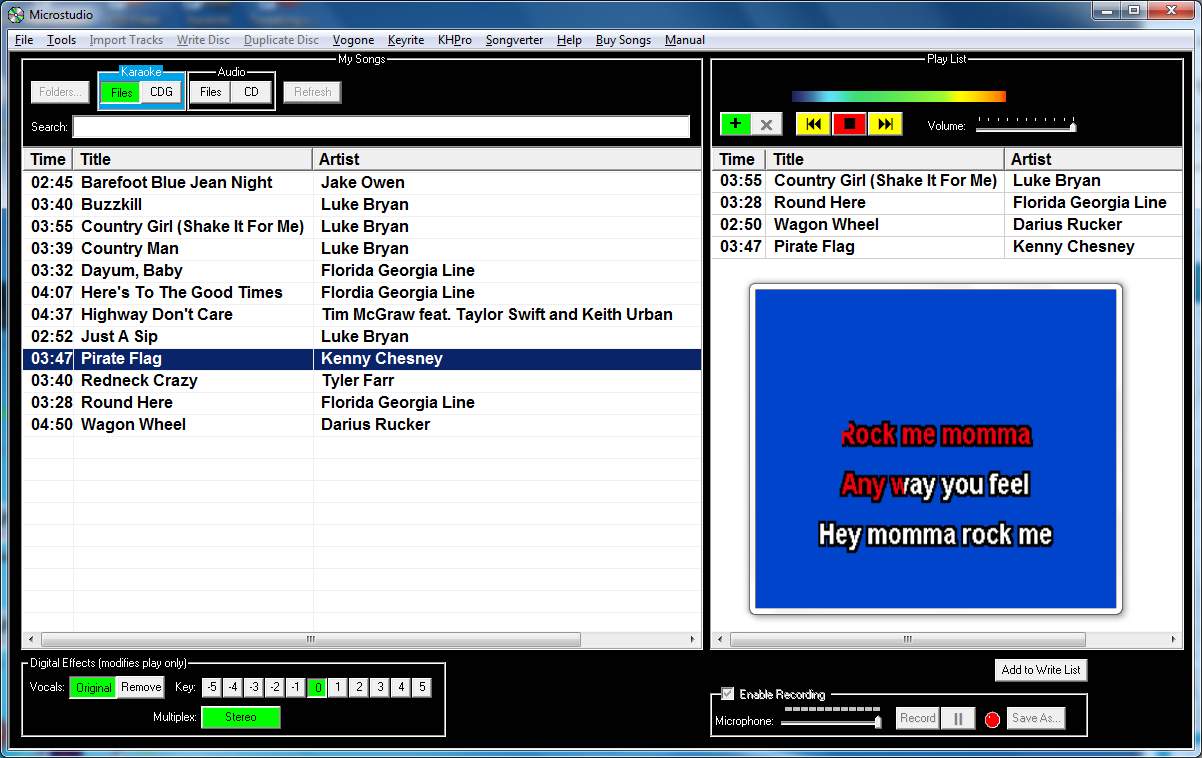
- Home Karaoke Player to practice at home (dual-display), playing from the hard drive or direct from Discs.
- Record the Singer while singing, allowing multiple takes in sync for sound-on-sound multi-track, talking books, demo discs, etc. then burn a CD.
- Vocal Remove & Key Change while playing.
| Microstudio® | ||
| Product | Internet Download | With USB Memory Stick |
|---|---|---|
| Order Microstudio 4.41 Software |  |
$109.99 |
| Order Microstudio Software Upgrade | $29.99  |
|
| Video Hoster® Suite 4 on USB Memory Stick including Microstudio, Vogone, KHPro, Keyrite and Hoster | |
|
| Karaoke Suite 4™ on USB Memory Stick including Microstudio, Vogone, KHPro and Keyrite | |
|
|
|
||
CDR Drives
| DVD+R/CDR 18X-24x Drive, MTU Certified Drive for MTU software | SATA $129.99 |
USB $149.99 |
CDR Media
| Blank CDR Discs, MTU Karaoke Certified | 100 Qty - $84.99 |
300 Qty - $179.99 |
Discover Why Microstudio is Perfect For You...
|
|
||
Import Ultimate Quality |
Microstudio, evolved since 1992, has the best error correction available today (download demo for proof). We tested all competiting products, importing tracks from some NEW commercial discs and found errors on the last lyrics screens were so bad you couldn't even see words or highlighting. Using Microstudio with Ultra-Clean™ error correction, the same imported tracks were very useable. If on-line, the FreeDB database identifies and fills in the tracks Title, Artist and DiscID for many discs. | |
Supports All Burners |
It is very rare that a current DVD burner won't work for karaoke discs. However, our quality claims are for MTU Certified DVD Burners. Test your drives with the free demo software to see if they read and write karaoke cdg discs. | |
Backup Your Discs |
Backup Karaoke CDG, Video CD, Audio CD, USB Memory Stick, and DVD (1-side single layer). Badly scratched discs will not copy, but most tracks will import so you can burn them to a custom disc. | |
Create Custom Discs |
Create new Karaoke or Audio discs with any mix of your songs in these formats; MP3+G, WMA+G, ZIP, BIN, KMA, WMA, MP3 and WAV. Your custom lists on the hard drive can open any time to change or create another disc. You can also export your list track names to print in other label making programs. | |
Home Karaoke Player |

Turn your PC computer into a home karaoke player to inspect the song quality, practice songs, or run home shows. The My Songs window shows songs on the hard drive or a CD/CDG disc, simply drag-n-drop them into the Play List to sing, or to burn them to a new disc. You can run other programs while playing because Microstudio barely uses the processor. Play controls include; Start, Stop, Restart, Play Next and Volume. You can play any mix of file formats: KMA, MP3+G, WMA+G, WAV+G, ZIP, BIN, MTU CDG, WMA, MP3, WAV. |
|
Record Singers |
When you play a song and sing into the Microphone, you are ALWAYS recorded to a hard drive temp file to insure you never miss a "good take". If you want to keep that recording, just name and save it, appearing in the Playlist so you can click to play it and record more takes in sync to it. You can mix unlimited recorded music instruments and vocal tracks, being your own harmony or backup singer(s). |
|
DSP Key Change |
If a song is beyond the range for your voice, simply click the built-in ±5 semitone key change buttons so you don't strain your voice. The tempo playing time is unchanged. | |
DSP Vocal Remover |
If you have an audio song with vocals, Microstudio has 4 buttons to selectively remove vocals. Users report that with some songs, due to the high quality filtering and bass and treble boosts the music sounds better than the original! | |
Run Other MTU Programs |
Clicking any of the four Menu Bar commands at the top runs the other Karaoke Suite programs and Songverter File Converter if you bought them. Your selected default folder passes to the other programs so imported files are instantly available. After removing vocals, key changing, adding song lyrics in sync to the music, or converting file formats, simply save the file. Then, use Microstudio to play your songs, or write them to new karaoke or audio format discs. | |
CDR Disc Media |
For best results, we only recommend MTU CDR discs as we found the best manufactured CDR disc for the special needs of Karaoke singers and hosts. | |
Computer Requirements |
|
|
Installation & Registration |
Microstudio requires your computer to be connected on-line to the Internet to install but not to run. Microstudio can install on 2 computers you own. You also can remove it from a working computer and install it on another computer at any time. | |